


Introduction
This is the first installment of a three-part technical series detailing the end-to-end observability and log tracking architecture deployed at Red Oak Strategic to go from Step Function orchestration to Amazon Quick dashboards. By breaking this comprehensive case study into modular segments, we provide a targeted look at the specific orchestration, replication, and visualization layers that comprise our "dev vertical" monitoring framework.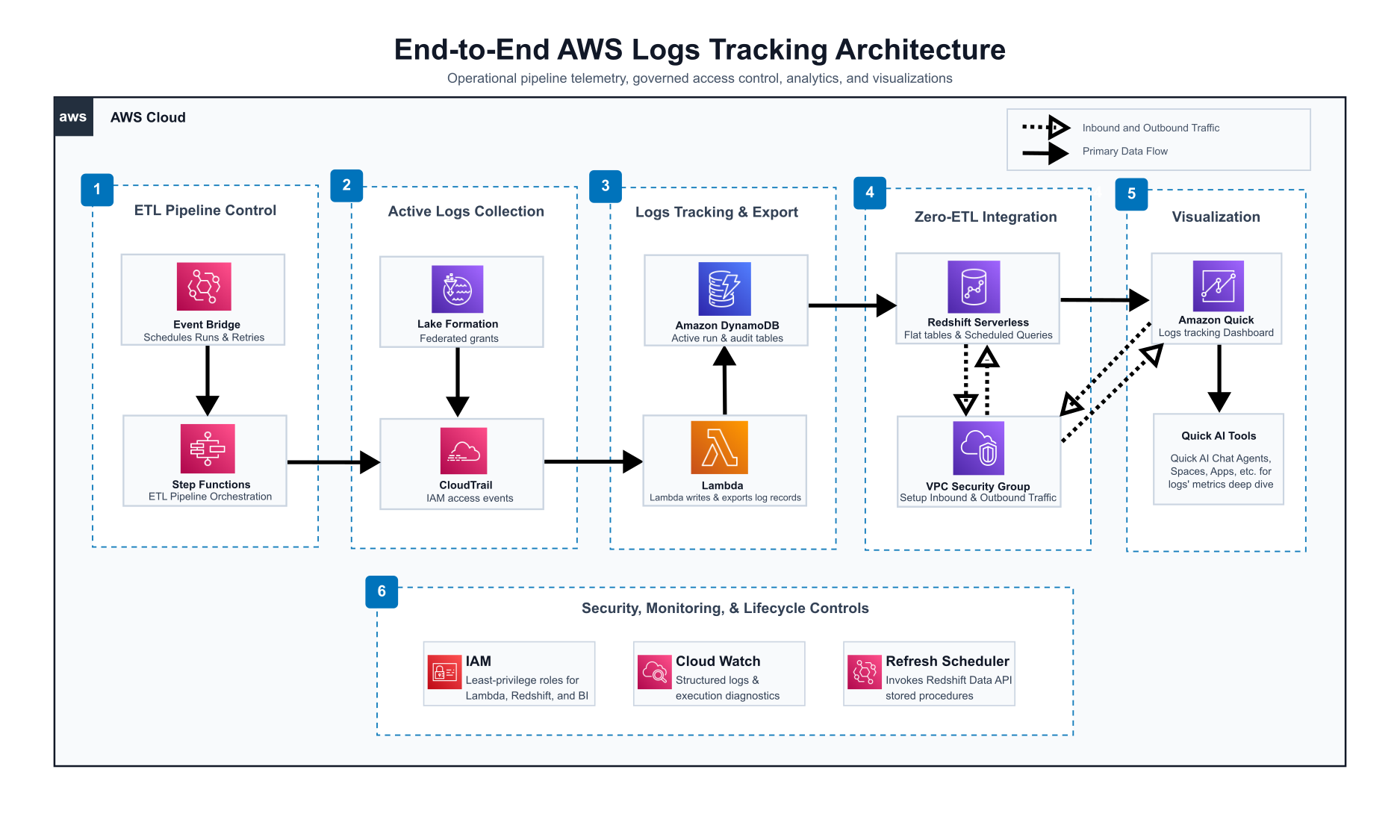
1. A Serverless AWS Pattern for Managing ETL Logging at Scale
This section acts as the architectural foundation of the series, detailing the initial capture and consolidation of execution telemetry. It focuses on the upstream orchestration performed by AWS Step Functions and Lambda, emphasizing how structured logging contracts and SQS FIFO serialization ensure that raw operational data is reliably captured in DynamoDB before downstream processing begins. This foundational capture layer is critical for establishing the data integrity required for the entire observability framework.
The architecture shows execution telemetry from AWS service pipelines, consolidates records into DynamoDB tables organized by vertical, replicates that data into Redshift Serverless through DynamoDB Zero-ETL integration, transforms it via stored procedures on incremental schedules, and surfaces it in Amazon Quick dashboards through VPC-secured connections with SPICE-backed or direct-query datasets.
Understanding this architecture is critical, as it serves as the foundational structure that ensures reliability, security, and cost-efficiency for our data operations. The flow spans six distinct layers, each with clear boundaries and contracts between them.
The following table summarizes the six-layer architecture, which we will explore in detail throughout this three-part series.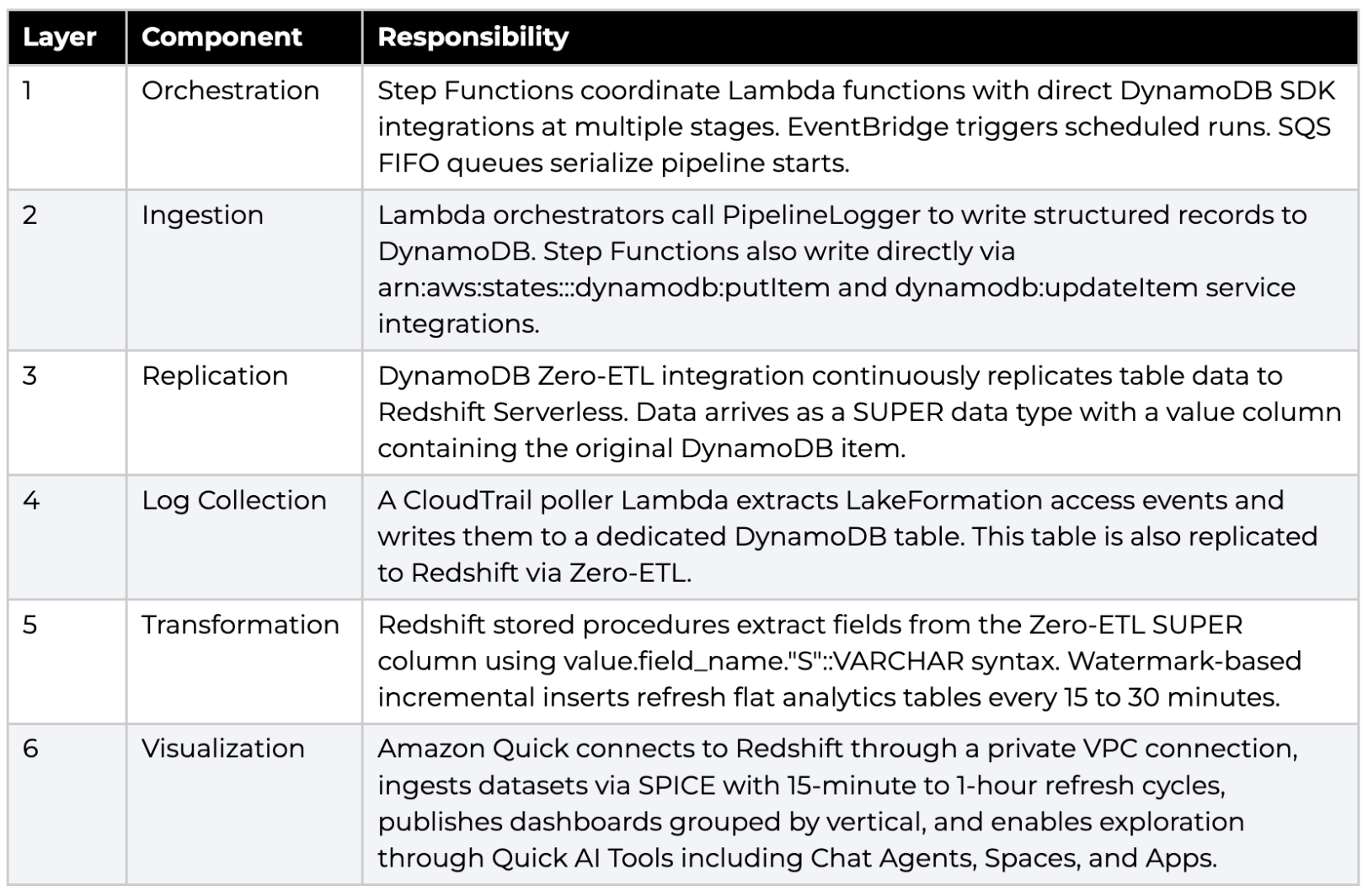
2. Pipeline Orchestration Layer
Each data vertical operates its own Step Function state machine. These state machines coordinate Lambda functions through a standard sequence: extract source data, clean or transform it, convert to Parquet, and merge into the data lake. A shared orchestrator pattern ensures that every stage transition is logged to DynamoDB before the next step begins.
2.1 Step Function State Machines
The dev environment runs multiple state machines, each scoped to a single data source. The primary pipelines include: 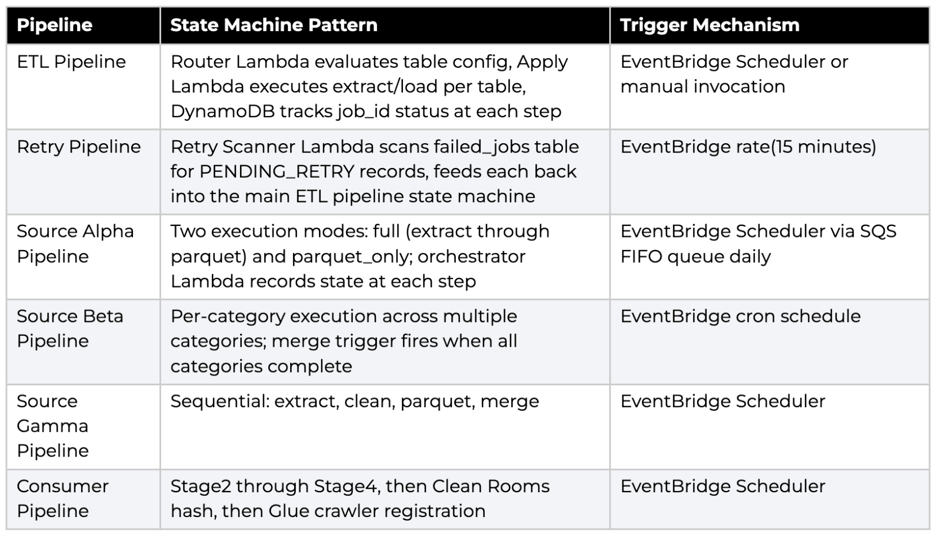
2.2 Lambda Orchestration and Logging Contract
Every ETL pipeline Lambda imports PipelineLogger from the shared module. This logger is the single entry point for all DynamoDB writes. The contract enforces full-schema writes, meaning every put_item call includes all 12 fields regardless of which stage is reporting. No partial updates are permitted.
The three public methods are:
- log_stage_start: Writes a RUNNING record with the current UTC timestamp.
- log_stage_done: Writes a DONE record, optionally including a file_fingerprint for deduplication.
- log_stage_failed: Writes a FAILED record with error_details truncated to 1,000 characters and an error_summary capped at 500 characters.
Sample: PipelineLogger Usage in a Lambda Handler -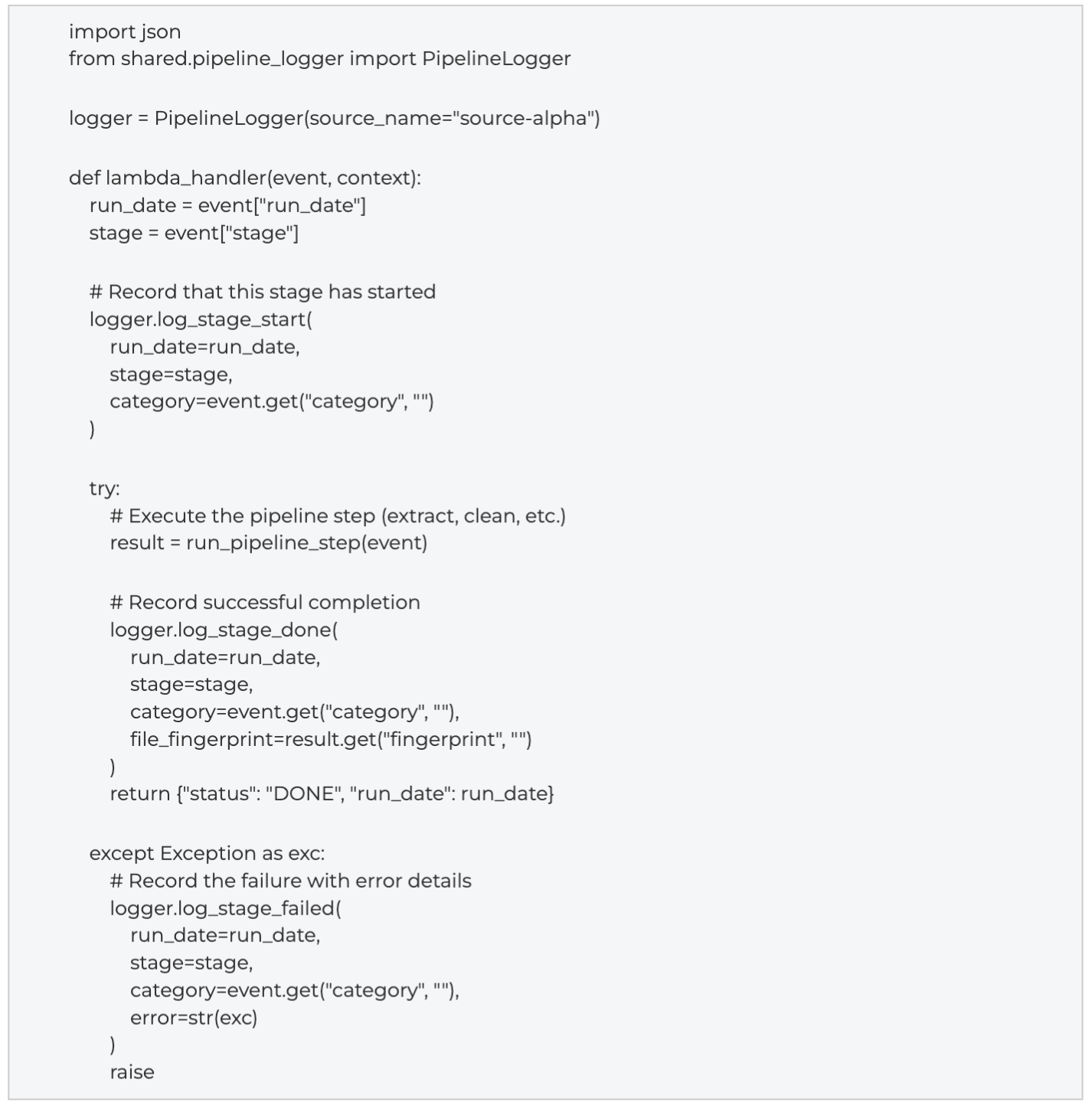
The DynamoDB partition key follows the pattern {source}#{category}#{stage}#{run_date} when a category exists, or {source}#{stage}#{run_date} without one. The job_id groups all stages for a single run as {source}#{run_date}. Run dates are always stored as YYYYMMDD strings. Timestamps use ISO 8601 with UTC (trailing Z, no microseconds).
2.3 EventBridge Scheduling
EventBridge serves two roles in this architecture. First, it triggers pipeline executions on daily cron schedules. Second, EventBridge drives the retry pipeline at a 15-minute rate, scanning the failed-jobs DynamoDB table and resubmitting eligible records to the main state machine. EventBridge Scheduler (as distinct from EventBridge Rules) is used for pipelines that require flexible retry policies, with a 3,600-second maximum event age and up to 3 automatic retries before dead-lettering.
CLI: Create an EventBridge Schedule for a Pipeline -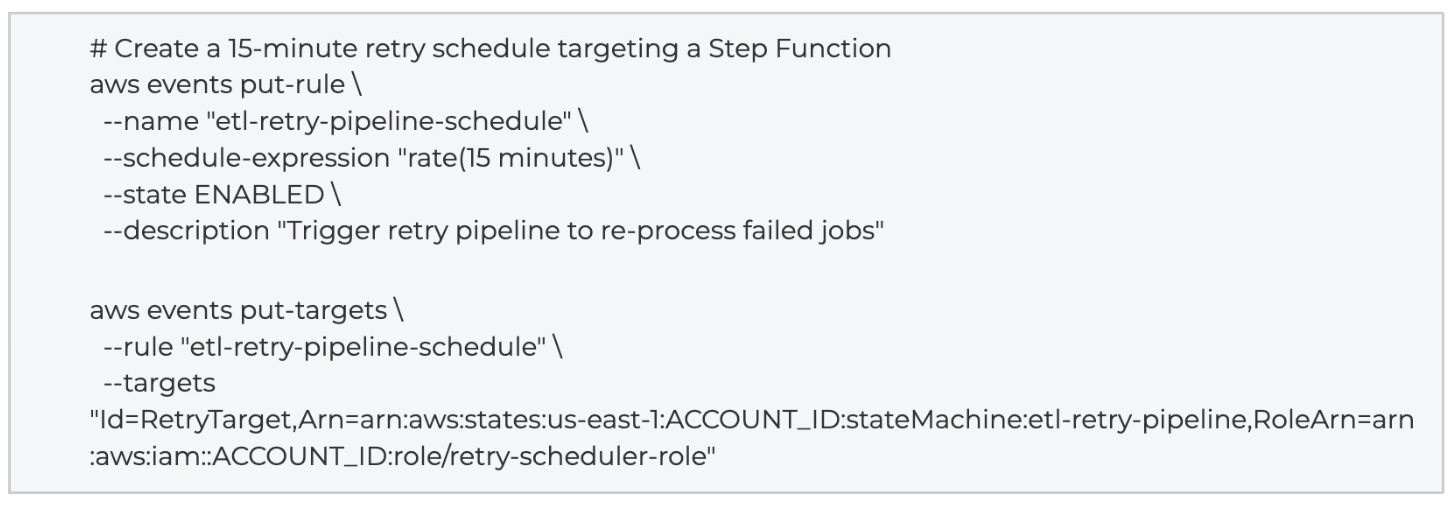
2.4 Step Functions Direct DynamoDB SDK Integrations
In addition to Lambda-based logging, the Step Function state machines write directly to DynamoDB at multiple pipeline stages using AWS SDK service integrations. These integrations use the resource ARN pattern arn:aws:states:::dynamodb:putItem (or dynamodb:updateItem) and execute DynamoDB operations without invoking a Lambda function.
The primary direct integration stages are:
- InitJob: Creates the initial job record in DynamoDB with status RUNNING before any Lambda executes.
- UpdateProgress: Updates the record at intermediate checkpoints using dynamodb:updateItem.
- DevSucceeded: Sets the final status to SUCCEEDED with completion timestamp.
- DevFailed: Sets the final status to FAILED with error details extracted from the Catch block.
Error handling for DynamoDB throttling is built into the state machine definition. Each DynamoDB integration state includes retry policies for DynamoDB.ProvisionedThroughputExceededException, ThrottlingException, and ConditionalCheckFailedException with exponential backoff.
Sample: ASL Snippet for Direct DynamoDB Integration -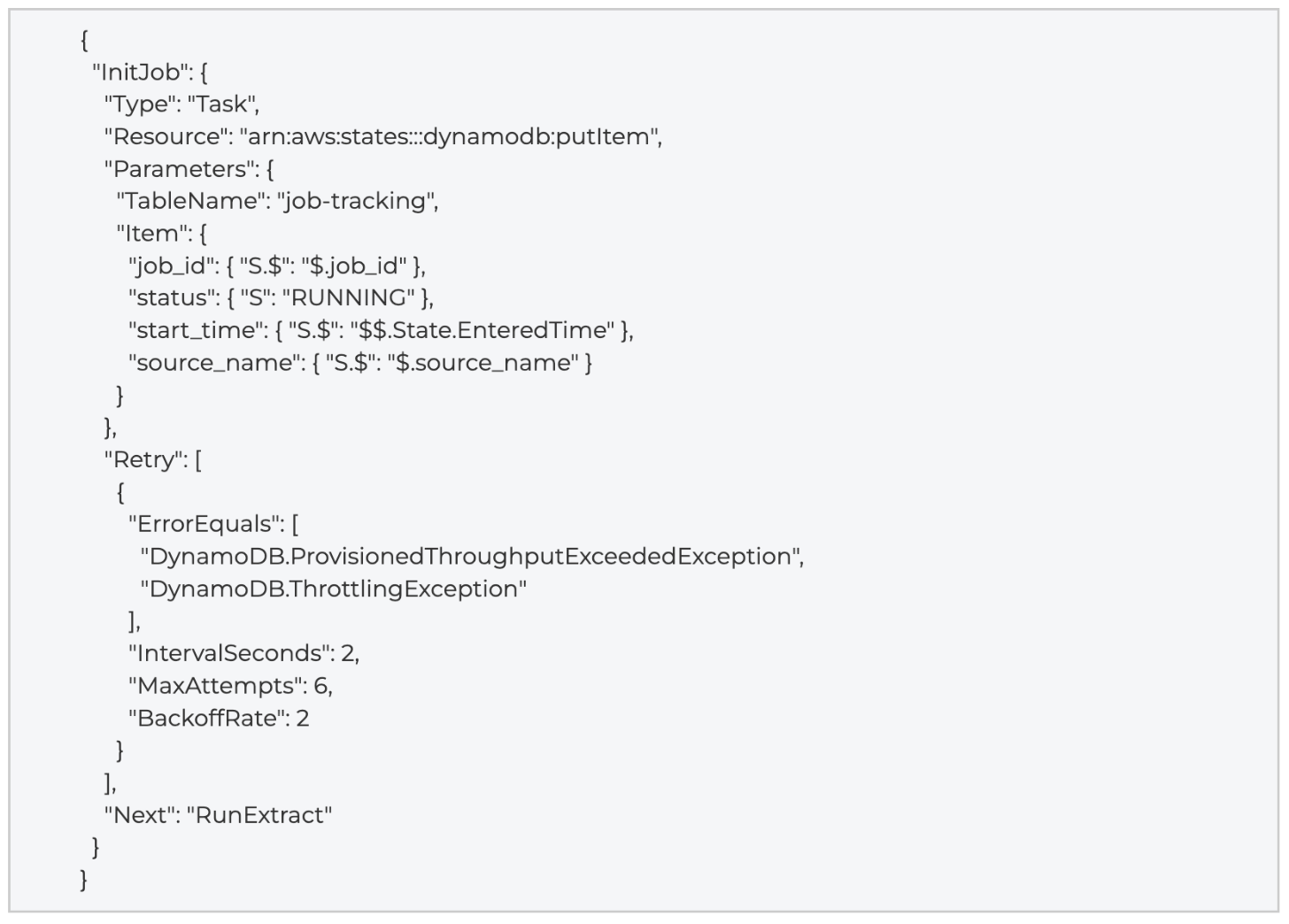
3. SQS FIFO Serialization and Dead Letter Queues
Some pipeline verticals use SQS FIFO queues to serialize Step Function executions and prevent concurrent runs of the same pipeline. This pattern ensures that only one execution of a given pipeline runs at any time, avoiding race conditions on shared resources such as Redshift tables or S3 prefixes.
3.1 Trigger Flow
The serialization chain follows this sequence: an S3 event notification (or EventBridge schedule) sends a message to an SQS FIFO queue with a single MessageGroupId per pipeline. A consumer Lambda reads from the queue with batch_size set to 1 and reserved_concurrency set to 1, creating a natural serialization point.
3.2 Consumer Lambda Logic
Before starting a new Step Function execution, the consumer Lambda checks for any RUNNING execution of the same state machine. If a RUNNING execution exists, the consumer extends the SQS message visibility timeout by 300 seconds and returns without starting a new execution. This causes SQS to redeliver the message after the visibility timeout, effectively polling until the running execution completes.
Sample: SQS FIFO Consumer Lambda -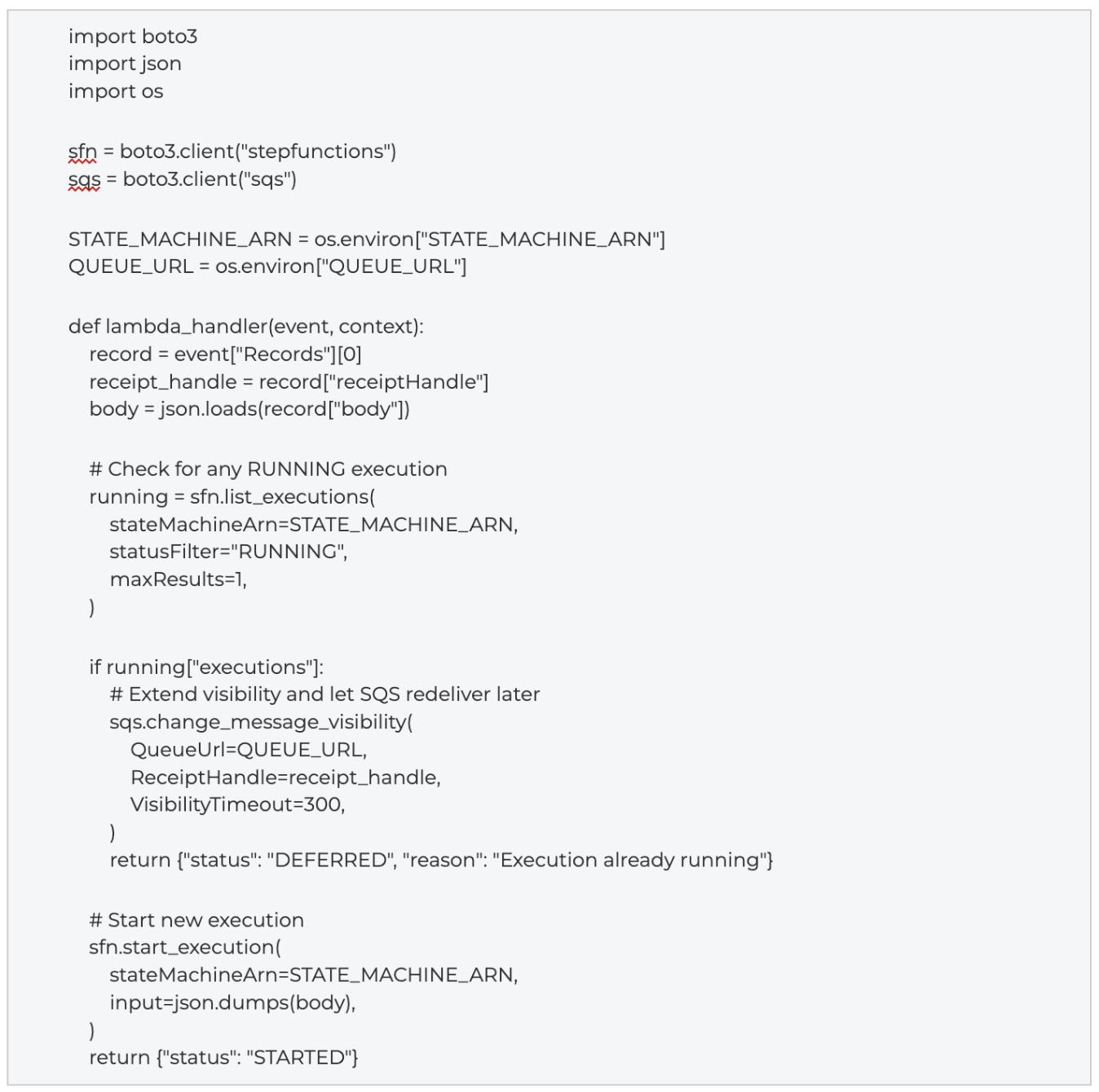
3.3 Dead Letter Queue Configuration -
Messages that fail processing after 288 receive attempts (approximately 24 hours at 300-second visibility intervals) move to a FIFO dead letter queue. The DLQ uses 14-day message retention to provide a recovery window for operations teams.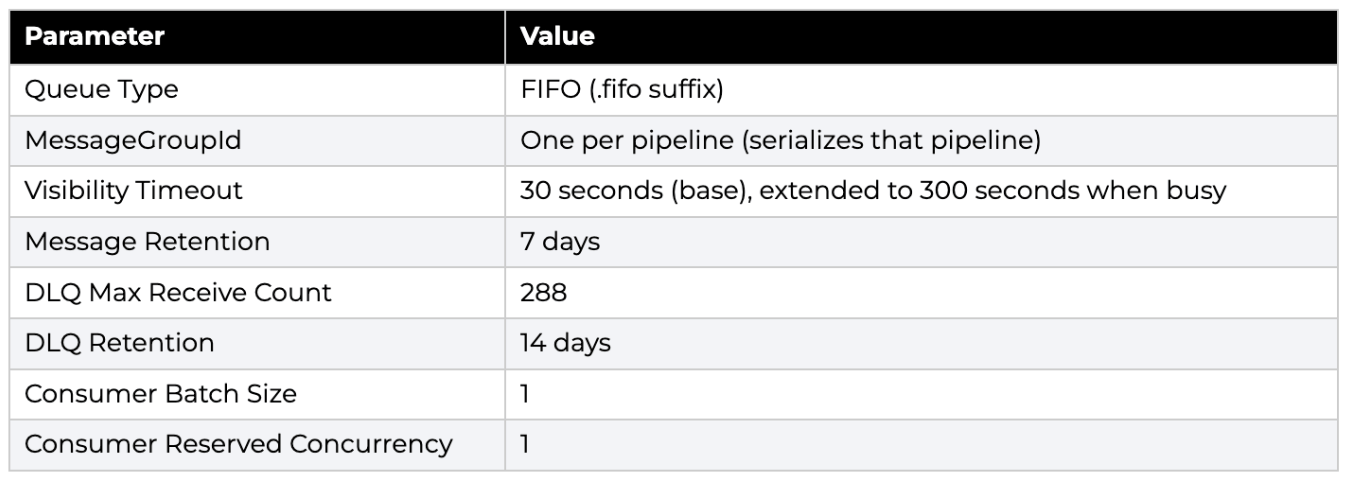
CLI: Create the FIFO Queue with Dead Letter Queue -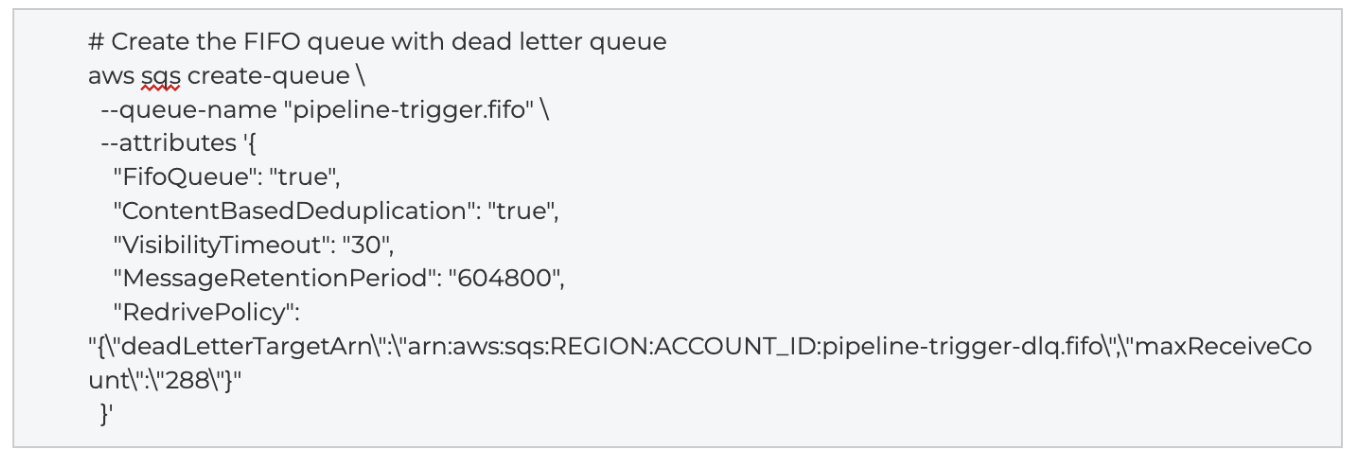
4. Data Catalog and Lake Formation as a Log Source
AWS Lake Formation manages fine-grained access to the data lake. In the context of this log tracking architecture, Lake Formation serves primarily as a log source rather than as the governance mechanism for the log data itself. CloudTrail captures Lake Formation API events (such as GetDataAccess, GrantPermissions, and RevokePermissions), and a dedicated Lambda poller extracts these events and writes them to DynamoDB for downstream analysis.
4.1 LakeFormation Access Events as Telemetry
The access events Lambda (described in detail in Section 12) queries CloudTrail for events where the event source is lakeformation.amazonaws.com. These events capture who accessed which data lake resources, whether access was allowed or denied, and the IAM principal involved. This telemetry feeds the Access Log dashboard in Amazon Quick.
4.2 LakeFormation Federated Grants for Redshift
LakeFormation also manages fine-grained access to the Redshift federated catalog. Grants are defined in YAML configuration files and applied through IaC (Terraform). The dev environment scopes grants to the bi_reports database within the Redshift LakeFormation catalog.
Access is tiered by IAM Identity Center (SSO) role: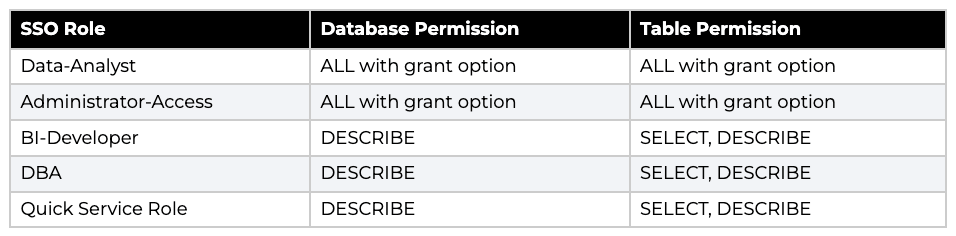 Sample: LakeFormation Federated Grants YAML -
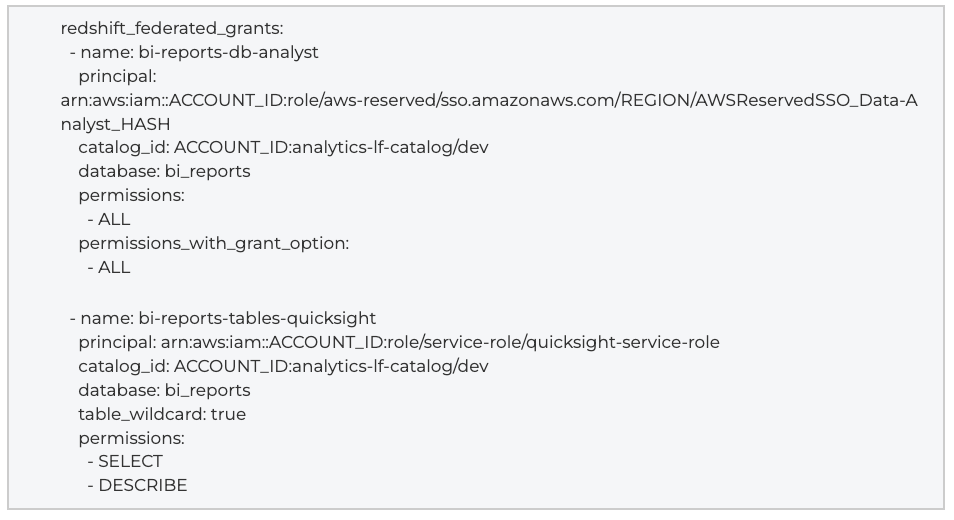 The Quick service role receives read-only access, which allows Amazon Quick to query Redshift flat tables and views through the federated catalog without requiring separate Redshift credentials
4.3 Glue Crawlers and Partition Projection
AWS Glue Data Catalog provides the metadata layer. Pipelines register tables in one of two ways: Glue crawlers with LakeFormation credentials for verticals that require governed access (such as Clean Rooms data), or partition projection for verticals where Athena queries can infer partitions directly from S3 path structure without crawling.
Crawlers that operate under LakeFormation use a dedicated IAM role (AWSGlueServiceRole-lakeformation) with use_lake_formation_credentials set to true. The TableLevelConfiguration depth is set to 4, which accommodates the year/month/day/hour partition structure.
CLI: Create a Glue Crawler with LakeFormation Credentials -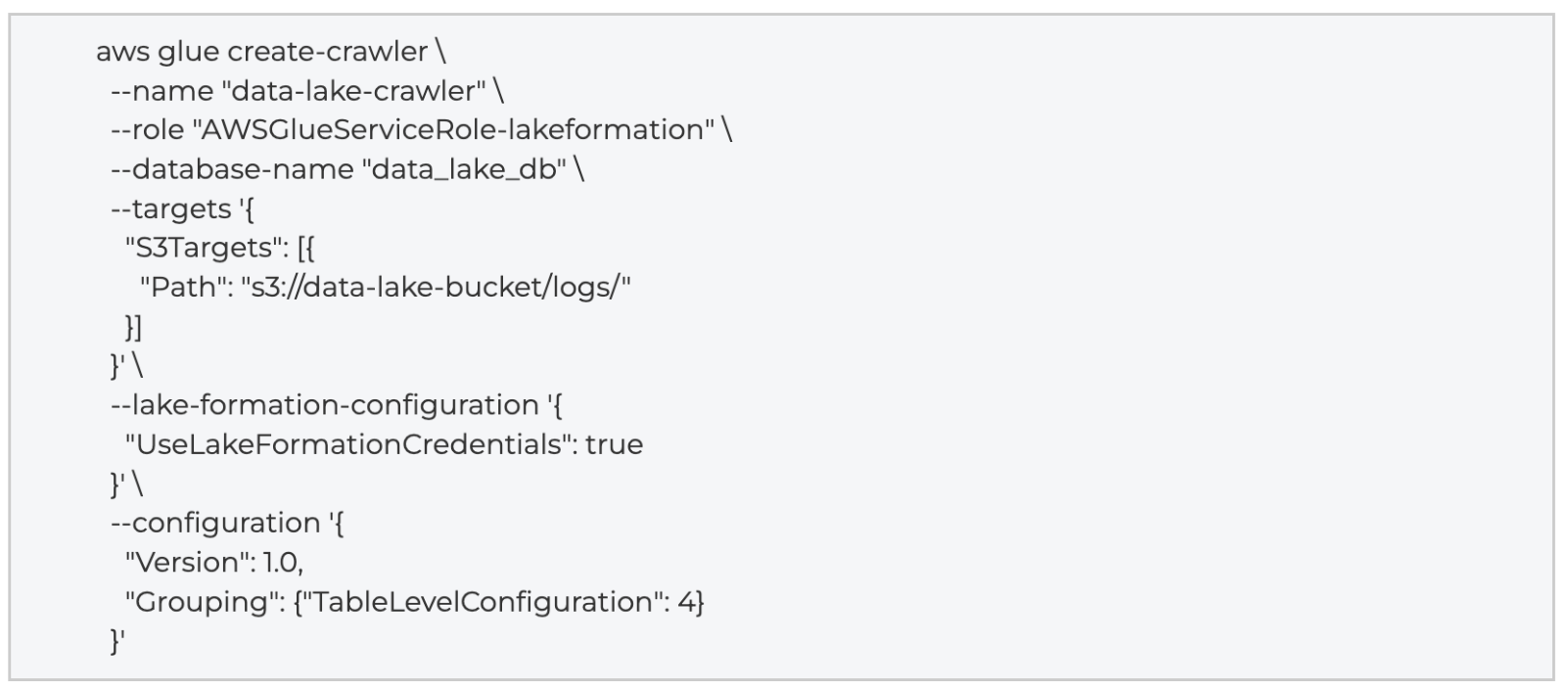 For most data pipeline verticals, partition projection replaces crawlers entirely. The Glue catalog table definition includes projection configuration that tells Athena to derive partition values from S3 paths at query time. This avoids the operational overhead of scheduled crawler runs and removes the risk of partition staleness.
5. DynamoDB Consolidation by Vertical
The architecture uses a small number of DynamoDB tables, each consolidating records from across pipeline verticals rather than creating per-source tables. This vertical consolidation reduces table sprawl, simplifies IAM policies, and makes cross-vertical queries straightforward. 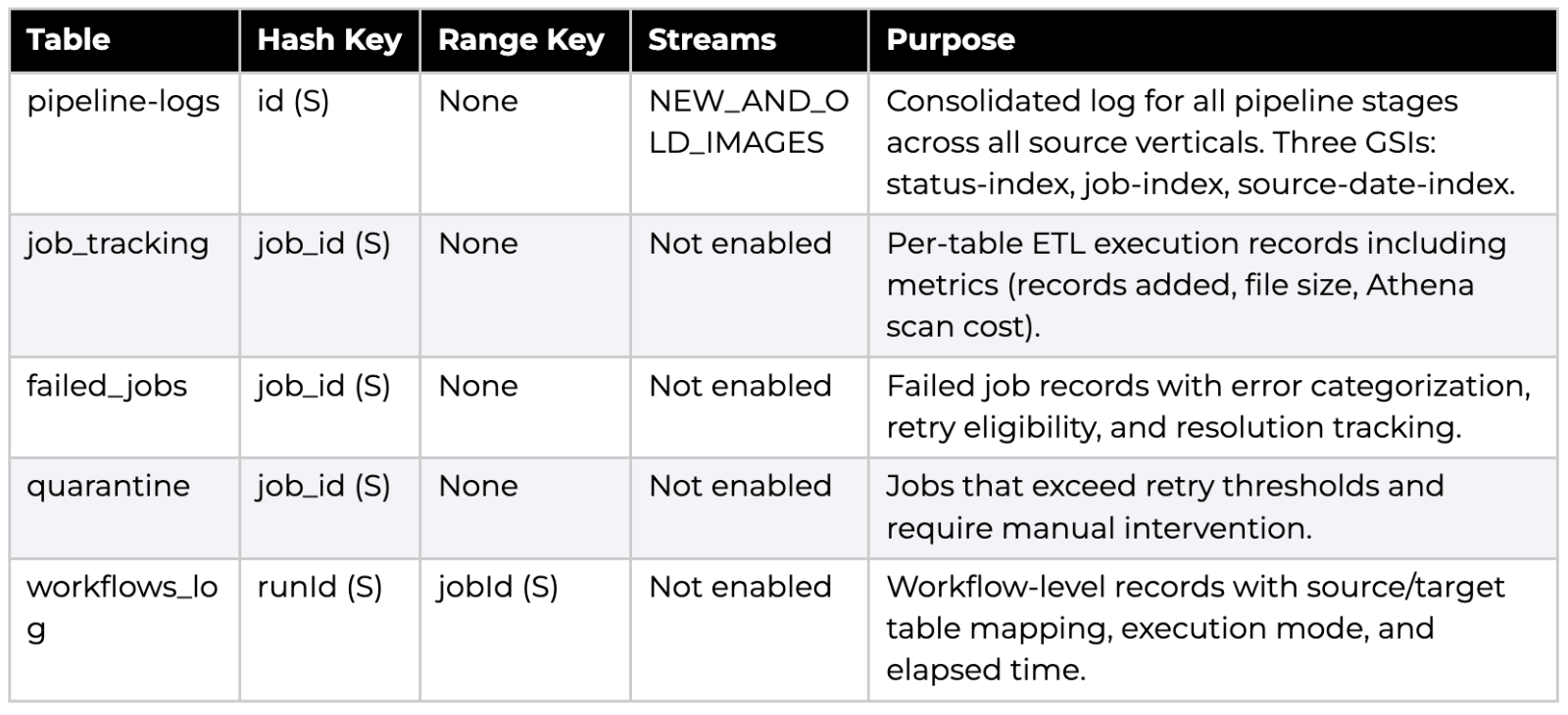 In addition to the primary tracking tables, the following access tracker tables support the CloudTrail polling flow:
5.1 Record Schema and Key Design
The pipeline-logs table uses a composite string key (source#category#stage#run_date) as the partition key. This design collocates all stages of a single run under one job_id (source#run_date), which enables efficient queries to determine pipeline health across verticals. The three Global Secondary Indexes provide access patterns by status, by job grouping, and by source plus date.
Sample: DynamoDB Table Definition (Terraform) -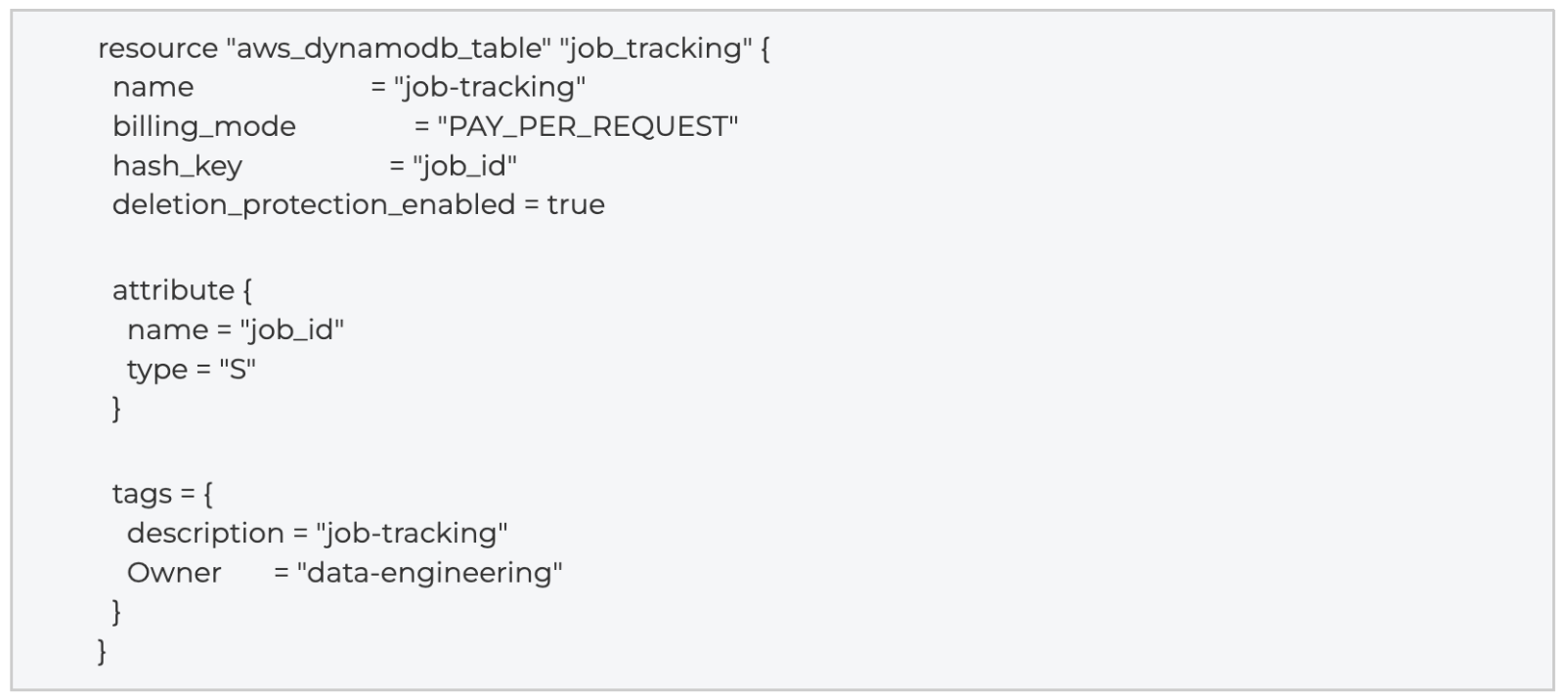
CLI: Query DynamoDB for Failed Jobs -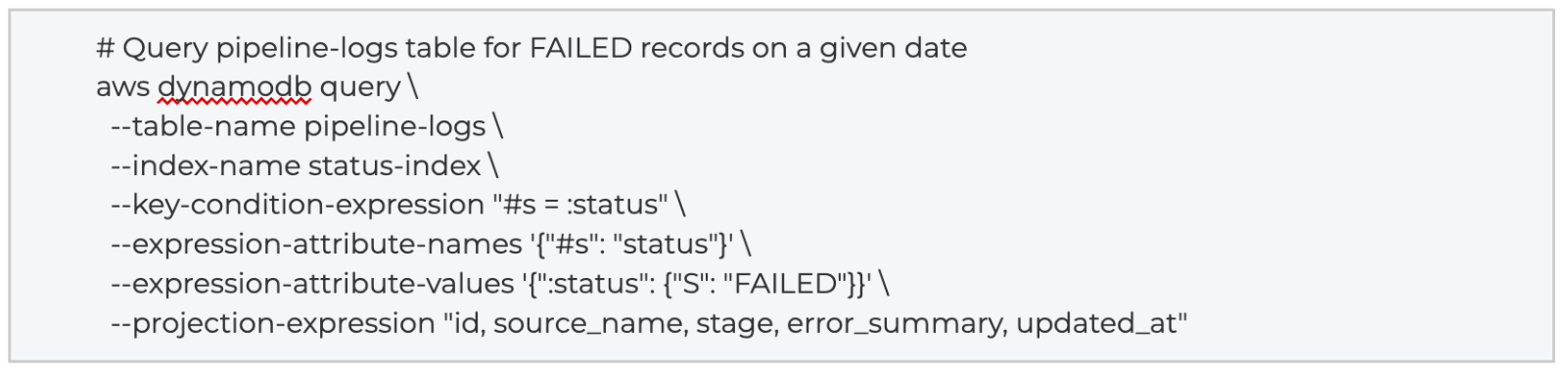
Conclusion
Foundation Established. This first installment has established the critical orchestration and ingestion layer necessary for reliable log tracking at scale. By enforcing structured logging contracts and SQS-based serialization, we ensure high-fidelity telemetry capture. Having secured the raw operational data in DynamoDB, the next installment in this series, "Using DynamoDB and Redshift Zero-ETL Integrations as a 'Super' Power", we will pivot to the replication layer, detailing how we move this data into Redshift Serverless and apply advanced transformations for analytics.
Appendix
The following links point to official AWS documentation relevant to the services and configurations described in this series.
AWS Step Functions Developer Guide https://docs.aws.amazon.com/step-functions/latest/dg/welcome.html
Step Functions: State Machine Logging https://docs.aws.amazon.com/step-functions/latest/dg/cw-logs.html
Step Functions: AWS SDK Service Integrations https://docs.aws.amazon.com/step-functions/latest/dg/supported-services-awssdk.html
Step Functions: DynamoDB Service Integration https://docs.aws.amazon.com/step-functions/latest/dg/connect-ddb.html
Step Functions Pricing https://aws.amazon.com/step-functions/pricing/
AWS Lambda Developer Guide https://docs.aws.amazon.com/lambda/latest/dg/welcome.html
Lambda: Using SQS as an Event Source https://docs.aws.amazon.com/lambda/latest/dg/with-sqs.html
Lambda Pricing https://aws.amazon.com/lambda/pricing/
Amazon EventBridge Scheduler User Guide https://docs.aws.amazon.com/scheduler/latest/UserGuide/what-is-scheduler.html
Amazon EventBridge Rules https://docs.aws.amazon.com/eventbridge/latest/userguide/eb-rules.html
Amazon SQS FIFO Queues https://docs.aws.amazon.com/AWSSimpleQueueService/latest/SQSDeveloperGuide/FIFO-queues.html
Amazon SQS Dead-Letter Queues https://docs.aws.amazon.com/AWSSimpleQueueService/latest/SQSDeveloperGuide/sqs-dead-letter-queues.html
Amazon SQS Visibility Timeout https://docs.aws.amazon.com/AWSSimpleQueueService/latest/SQSDeveloperGuide/sqs-visibility-timeout.html
AWS Glue Crawler Configuration https://docs.aws.amazon.com/glue/latest/dg/define-crawler.html
AWS Glue Partition Projection https://docs.aws.amazon.com/athena/latest/ug/partition-projection.html
AWS Lake Formation Permissions https://docs.aws.amazon.com/lake-formation/latest/dg/lf-permissions-reference.html
Lake Formation: Granting Permissions on Redshift Resources https://docs.aws.amazon.com/lake-formation/latest/dg/redshift-granting.html
Amazon DynamoDB Developer Guide https://docs.aws.amazon.com/amazondynamodb/latest/developerguide/Introduction.html
Amazon DynamoDB Pricing https://aws.amazon.com/dynamodb/pricing/
DynamoDB Zero-ETL Integration with Redshift https://docs.aws.amazon.com/amazondynamodb/latest/developerguide/RedshiftforDynamoDB.html
DynamoDB: Enabling Point-in-Time Recovery https://docs.aws.amazon.com/amazondynamodb/latest/developerguide/PointInTimeRecovery_Howitworks.html
DynamoDB On-Demand Capacity https://docs.aws.amazon.com/amazondynamodb/latest/developerguide/HowItWorks.ReadWriteCapacityMode.html
DynamoDB Time to Live (TTL) https://docs.aws.amazon.com/amazondynamodb/latest/developerguide/TTL.html
Amazon Redshift Serverless Overview https://docs.aws.amazon.com/redshift/latest/mgmt/serverless-whatis.html
Redshift Serverless: Workgroups and Namespaces https://docs.aws.amazon.com/redshift/latest/mgmt/serverless-workgroup-namespace.html
Redshift Serverless Pricing https://aws.amazon.com/redshift/pricing/
Redshift Enhanced VPC Routing https://docs.aws.amazon.com/redshift/latest/mgmt/enhanced-vpc-routing.html
Redshift: Querying SUPER Data Type https://docs.aws.amazon.com/redshift/latest/dg/query-super.html
Redshift Stored Procedures https://docs.aws.amazon.com/redshift/latest/dg/stored-procedure-create.html
Redshift SECURITY DEFINER Procedures https://docs.aws.amazon.com/redshift/latest/dg/stored-procedure-security.html
Redshift Data API https://docs.aws.amazon.com/redshift/latest/mgmt/data-api.html
Amazon Quick VPC Connections https://docs.aws.amazon.com/quicksight/latest/user/working-with-aws-vpc.html
QuickSight: Connecting to Amazon Redshift https://docs.aws.amazon.com/quicksight/latest/user/create-a-data-set-redshift.html
Quick SPICE and Data Refresh https://docs.aws.amazon.com/quicksight/latest/user/refreshing-imported-data.html
Amazon Quick Pricing https://aws.amazon.com/quicksight/pricing/
QuickSight: Publishing Dashboards https://docs.aws.amazon.com/quicksight/latest/user/creating-a-dashboard.html
QuickSight: Managing SPICE Capacity https://docs.aws.amazon.com/quicksight/latest/user/managing-spice-capacity.html
Amazon Q in Quick (Chat Agents) https://docs.aws.amazon.com/quicksight/latest/user/amazon-q-in-quicksight.html
AWS CloudTrail User Guide https://docs.aws.amazon.com/awscloudtrail/latest/userguide/cloudtrail-user-guide.html
AWS CloudTrail Pricing https://aws.amazon.com/cloudtrail/pricing/
Amazon GuardDuty User Guide https://docs.aws.amazon.com/guardduty/latest/ug/what-is-guardduty.html
AWS Secrets Manager User Guide https://docs.aws.amazon.com/secretsmanager/latest/userguide/intro.html
VPC Security Groups https://docs.aws.amazon.com/vpc/latest/userguide/vpc-security-groups.html
Amazon S3 Pricing https://aws.amazon.com/s3/pricing/
AWS IAM Identity Center (SSO) https://docs.aws.amazon.com/singlesignon/latest/userguide/what-is.html
Redshift Stored Procedure Security Model https://docs.aws.amazon.com/redshift/latest/dg/stored-procedure-security-and-privileges.html
Scheduling Queries in Redshift Query Editor v2 https://docs.aws.amazon.com/redshift/latest/mgmt/query-editor-schedule-query.html
Contact Red Oak Strategic

Data
The Problem: AI Pilots Are Easy to Start and Hard to Scale AI is no longer a future-state conversation for most organizations. Leadership te...


Data
Why Real-Time Data is Becoming Mission-Critical for Law Enforcement In modern law enforcement, every second matters. Whether responding to a...

Machine Learning
Deep Dive: AWS Lake Formation Governance (AWS Commercial & GovCloud) This blueprint defines the architecture, control model, and Infrast...